Compare characteristics and costs
USB-C chargers and cables: check compatible features
Compare the power, ports, load sharing, cable length, and data or video functions required.
Quick response
Essential in a minute
Leave the device's manual: the expected connector, power and load protocol. Then check the charger and cable separately. The USB-C shape is not enough to establish the transfer speed, the video output or the available power when several devices are connected.

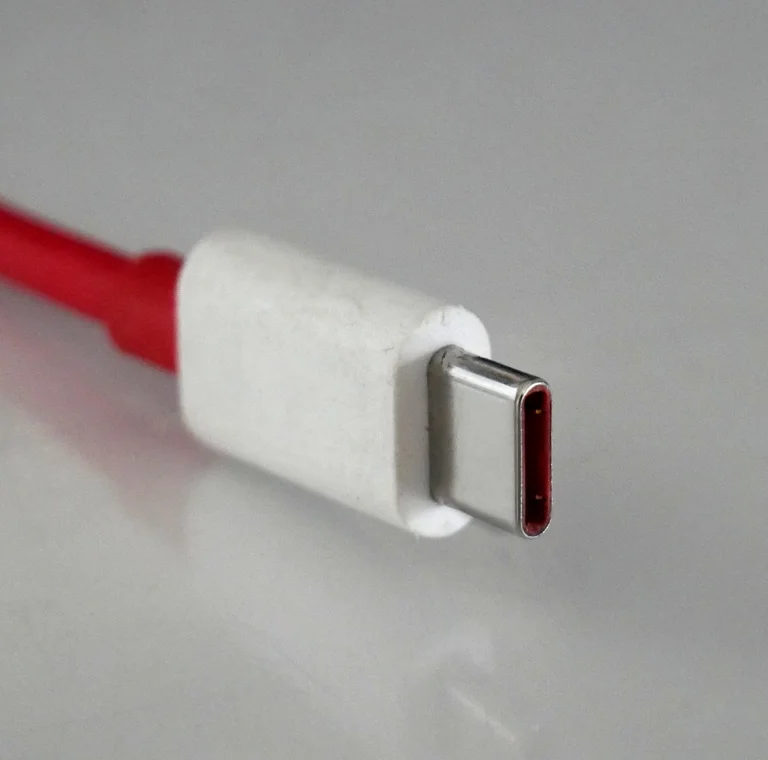
A real visual reference
Recognise the shape, then check the functions
This photograph helps you recognise the connector. The USB-C shape alone does not confirm charging power, data speed or video support. Compare the specifications of the charger, cable and device port separately.
Read the needs of each device
Remove the exact model of the phone or computer and the characteristics of the recommended charger. A computer with a USB-C socket does not necessarily accept charging through all its ports. For a screen, also check the video function of the port and the connection mode provided by its notice. Distinguish the need to recharge only the need for file transfer or display.
- Accurate template and record found.
- Recharging port identified.
- Use set load, data or video.
Compare the power actually available
The total power of a multi-port charger does not necessarily match that of each output. Look for the distribution array with one, two or three connected devices. Check the announced protocols and port combinations; a fast charging statement without context does not describe the compatibility with your model. Compare the usage scenario that interests you, for example a computer and a phone at the same time.
- Port power and total power distinguished.
- Multiport distribution consulted.
- Confirmed compatible protocol.
Choose a cable for the desired function
Increase its length, nominal power and announced flow rate. L的USB-IF distinguishes these characteristics in its certification markings, including with power capacities of 60 W or 240 W. These logos do not make cables equivalent for all functions: a load capacity does not describe the video or the transfer speed. Check the specifications rather than the colour or thickness of the cable.
- Useful length measured.
- Power and flow measured separately.
- Video function explicitly documented if necessary.
Check the contents of the batch and keep the references
A charger can be sold without a cable. Compare the cost of the necessary set and see if the main outlet is suitable for the country of use. After receipt, keep a model, invoice and notice; follow the ventilation and use instructions. A damaged accessory or abnormal behavior should be discarded and reported to the seller.
- Cable included or cost added.
- Adapted sector socket.
- Record and invoice kept.
Compare
The information to be collected in order to compare
| Criteria | Note | Why? |
|---|---|---|
| Connector | USB-C device side and charger side | The form does not describe all the functions |
| Power | Output used and multiport sharing | The announced total can be shared |
| Cable | Length, watts, flow rate, video | Specifications are independent |
| Content | Charger, cable, socket | Avoiding a forgotten expense |
Fictional example · No merchant prices
The charger alone may not make a complete kit
Fictional example: a €25 charger needs a €12 compatible cable and €5 delivery, totalling €42. A €38 kit includes the necessary cable and delivery. The kit costs €4 less if power ratings, protocols and stated uses actually suit the device.
| Expense item | Offer A | Offer B |
|---|---|---|
| Product or basket | 25.00 € | 38.00 € |
| Extras | 12.00 € | 0.00 € |
| Delivery and setup | 5.00 € | 0.00 € |
| Total of included items | 42.00 € | 38.00 € |
A USB-C connector does not guarantee every data or video function.
- Check available power with all intended ports in use.
Before you continue
Final checklist : USB-C chargers and cables: check compatible features
Check the points you actually checked. Checks stay in this page during the visit; they are not sent to the server. A checked point does not constitute a validation of the merchant.
Guide: USB-C chargers and cables: check compatible features · Révision éditoriale : 28 October 2026.
Frequently Asked Questions
Useful answers
Does a USB-C cable still transmit the video?
Do not assume it. Check the computer port, cable and screen: all three must document the expected function.
Does a high-power charger make the charge faster?
The speed depends on the capabilities of the device and the protocols common to the charger and cable. Higher power is not guaranteed a gain.
Can we compare two multiport chargers by their total power?
Add the power of each output and its distribution when multiple ports are used. The actual scenario is more useful than the theoretical maximum.
To check
Reference sources and documentation
Sources consulted on .
The editorial update date does not guarantee a new verification of each source. See the references for an individual situation or regulatory evolution.
- USB-IF — Certified LogosPower and flow markings of cables; not worth a product recommendation.
- USB-IF — Update cable requirementsPower capacities and markings in the certification program.
Putting into practice
Explore relevant shops
Continue
Other purchase guides
Home Internet
Improve your home Wi-Fi
Distinguish internet and Wi-Fi coverage, compare measurements per room and choose a repeater or a suitable network after the first checks.
Read the guide
Telephone and digital use
Choose a smartphone for long-term use
Compare a smartphone from your applications, storage, battery, software tracking, and reception and migration controls.
Read the guide
Comparison of offers
Compare the total cost
Calculate the real cost of an order by comparing the price delivered, the time, returns, warranty and services included, not just the discount displayed.
Read the guide